Drafting Dilemmas
When I first started pattern drafting, over 20 years ago, I really didn’t understand what I was doing. I had some highly recommended drafting books and I could draft a pattern by following them exactly. The problem was that I was lost without those instructions.
I’ve been racking my brain trying to remember the point where I had that “aha” moment and suddenly got how drafting works. I don’t think there was just one point. It is definitely a progression over time and practice. I do remember the things that I found incredibly frustrating when I first started, so allow me to share those points in hope of getting you to the “aha” moment faster.
You Are Smart
Drafting is logical. Every line, every angle, and every curve has a mathematical purpose. It should make sense. If you stop and think about the human body and the pattern in front of you, the logic will reveal itself.
Never blindly follow instructions. Whether it’s from a video, a textbook, or a blog post, don't assume the instructions are correct. You’d be shocked at how many mistakes and 'typos' I’ve found in professional drafting manuals over the years.
Even as a beginner, give yourself some credit. If you draw a line and your intuition tells you, 'Wait, that looks off,' stop and check it. Don't just assume the teacher is right and you are wrong. I want to teach you how to see the logic for yourself, so you can draft with confidence and catch those errors before they ever touch your fabric.
Random Values Without Explanation
One of the things that frustrated me the most was when the instructions said to use the Waist Front measurement and add 1/4” (6mm). Sometimes they said it was ease, but many times they say nothing at all. What and why?
Is it ease?
If they are adding a value to a circumference measurement, like the waist or hips, it is almost always ease. If it says to take the waist front and add 1/4” (6 mm), that is adding 1/2” (12 mm) to the front because you are drafting half for a symmetrical pattern, meaning that 1/4” is added to both the left-front and right-front pieces.
You can’t assume that you’ll add the same to the back. Read the draft and see what it says. If they also have you adding 1/4” (6 mm) to the back, then that means the total ease added will be 1” (24 mm) to the waist for the entire garment.
It is important that you understand this because it makes a huge difference in how things fit. If you are working with a sloper, this is usually a small amount and it is strictly wearing ease.
Personally, I don’t think you should add any design ease to your slopers. While a sloper can have a tiny, consistent amount of breathing room (wearing ease), you want to avoid arbitrary style ease so you always know exactly what your starting baseline is. If you have a collection of patterns all originating from different sources, you’ll never be able to keep track of which ones have how much ease.
It is better to eliminate all design ease on these patterns so you know what you’re starting with. If you are using PatternMaker Pro, it gets simpler. You can add the ease as a measurement variable and change it every time you recall your pattern.
Giveth and Taketh Away
Sometimes they will have you add a small value like 1/4” (6 mm) in one place, and then turn around and have you subtract it in another. If you can find the direct correlation, the points are close to each other and it is just a shaping process, these are fine. You should try to understand why they did it, but it is generally a safe move.
“Standard” Assumptions
There are other values that can cause issues. Most of your drafting sources are working off of standard sizing tables. They can depend on one measurement having a direct proportional correlation to another. These can be a problem the further your body measurements stray from the standards. A perfect example of this is pants drafts. Did you know that some drafts do not take your waist measurement into consideration when drafting pants? I was shocked when I found this.
They base the draft off the hips because in standard sizing there is an exact correlation. If you use the hip measurement, they can trust that the waist will be exactly X inches less than the hip value. They instruct you to make the waist and waist darts using that logic.
I don’t have to tell you how badly this can go, if you have a waist that is larger or smaller than the standard proportion. My body is a perfect example. My waist is drafted at 35” (89 cm), I can't stand a tight waist, and my hips are 39” (99 cm). That’s only a 4” (10 cm) difference and standards are around 10” (25 cm). These pant drafts fail miserably when drafted for my body.
The Mystery of Curve Shapes
Drafting instructions will tell you to draw a smooth curve from one point to another passing through other guide points in the process. They say to use a French Curve tool for this. I have a French Curve and it certainly doesn’t define the curve shape. The angles are different all along its shape. Where do you align it to make that the perfect shape that isn’t too deep or shallow?
It feels to me as though authors relieve themselves of liability by telling you to buy a tool and all will become clear. That is not the case. You can hand sketch your curves or better yet, just use PatternMaker Pro and save yourself the money. Here are the things to keep in mind for greater success.
The curve is often going around a body part, like the neck or the armhole. You want to find the shortest, smoothest path around. The most important consideration is the beginning and end of the curve. These will be sewn to some other pattern piece. You want the transition to be smooth.
The best way to guarantee this is to make the start and end lines of the curve perpendicular to the adjacent line. Sorry, that sounded all mathy, but it’s not hard to understand with a simple image.
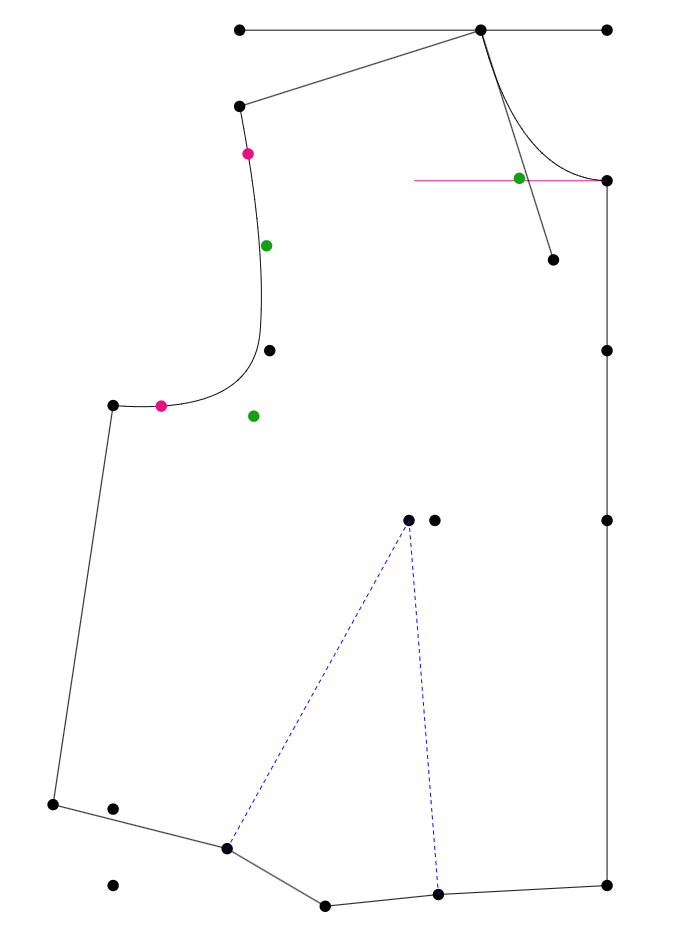
Front Bodice Armhole Curve
Here is an armhole on a front bodice. We want the top of the curve to run perpendicular to the shoulder line for a short distance, let’s say a minimum of 1” (25 mm). At the bottom of the curve in the armpit, let’s do the same. We’ll make it perpendicular to the side seam for an inch (25 mm). Here I've marked bright pink points at 1" (25 mm) for you to see. Mine are not perfectly perpendicular, which I'll explain in a moment.
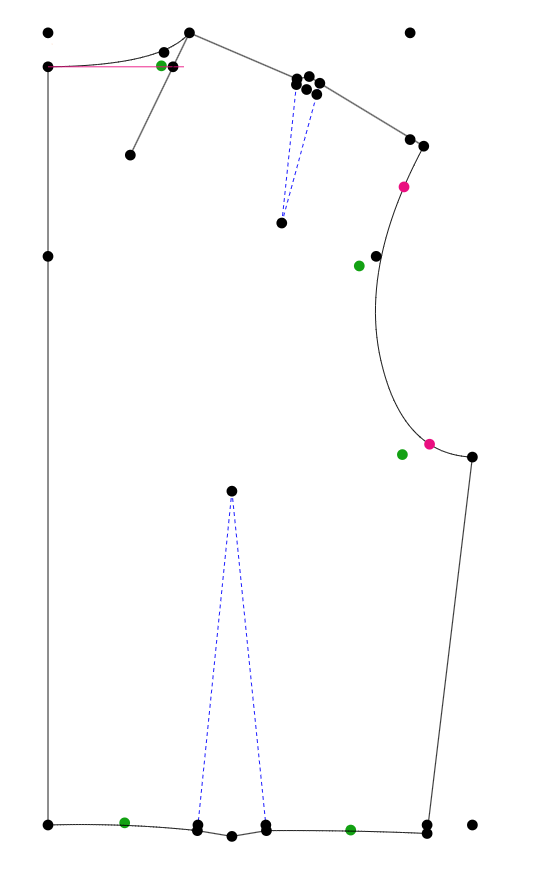
Back Bodice Armhole Curve
If we follow the same rule for the back, we can be assured that there will be a smooth transition from one to the other.
PatternMaker Pro has a tool called Curve Truing that allows you to see what your aligned curves will look like. Here I’ve used the tool for the armhole joining at the side seam. I can actively move the curve points on either curve and update the preview to get it just right. This is why mine are not perpendicular, I've adjusted them to make a very smooth overall curve where they join.
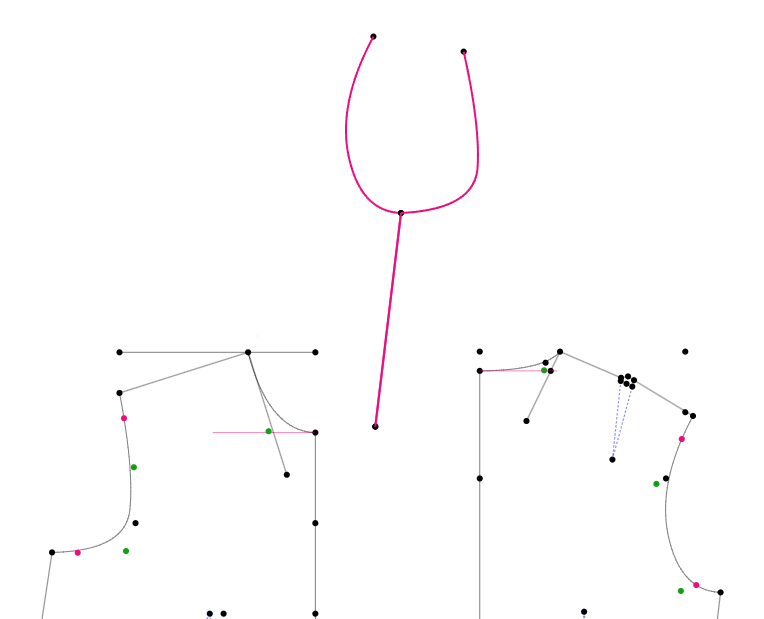
Curve Truing Joining Armhole at Side Seam
This tool allows you to quickly see consequences before you cut anything out. Here is the tool used on the armhole curve joining at the shoulder.
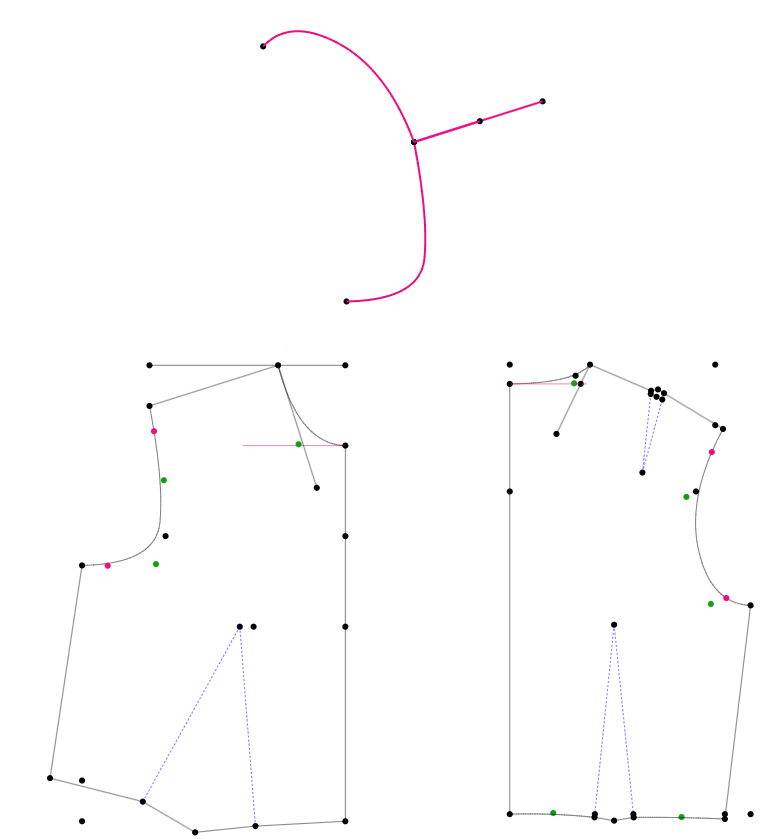
Curve Truing Joining Armhole at Shoulder
Learn more about the Curve Truing Tool in PatternMaker Pro.
Squaring, 90 Degrees, Right Angles?
You’ll find various terms in books telling you to create a point or line at 90 degrees or at a right angle or square to a line. These terms all define lines that are perpendicular to each other. This is done where two pieces will be attached at a seam. The lines have to be straight so that when they are sewn it creates a mirror image.
Much like the neckline issue mentioned above, where two items connect, you'll want to make the transition from one piece to another as smooth as possible.
This is particularly important on pieces that are placed on the fold of the fabric before they are cut. When a pattern piece is placed on the fold, that fold line acts as the absolute boundary of your pattern paper. You cannot draw any part of your pattern past that line. It must represent the clean, outer edge of your pattern template.
To avoid these problems, try to visualize the pattern mirrored over. You can use the Curve Truing tool to mirror the same curve over, too. Here's a neckline intended as a crew turned into a sweetheart with a curve dipped a little low.
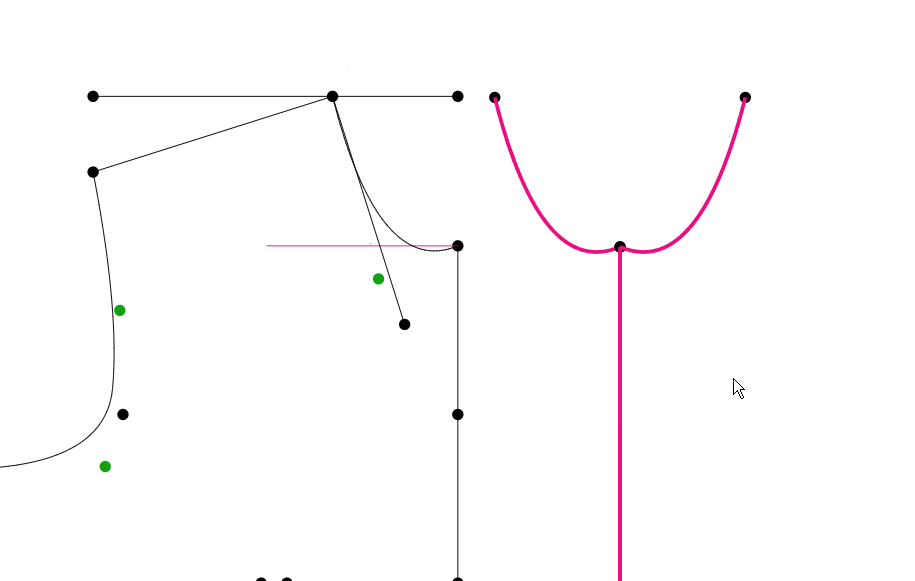
Curve Truing Easily Shows a Bad Neckline
Darts
Darts are an incredibly important part of pattern drafting and serve to form the fabric to the body. You’ll see that in action further down this page. How they are drafted can be a bit confusing.
When drafting a dart, you’ll determine the dart apex and the dart width. The dart apex is the point of the dart within the body of the pattern. The width is shown by the distance between the dart legs at the edge of the pattern. This shape forms a triangle pointing into the body, but at the seam edge, it extends outward into a pointed roof shape.
The reason for this is the extra material needed for the dart turnback extension shown in the illustration below. Darts are folded closed and then pressed to one side or the other. Generally, vertical (waist-bust) darts press toward the center of the garment, while horizontal (side-bust) darts press downward. When the dart folds over it requires additional fabric at the edge of the pattern.
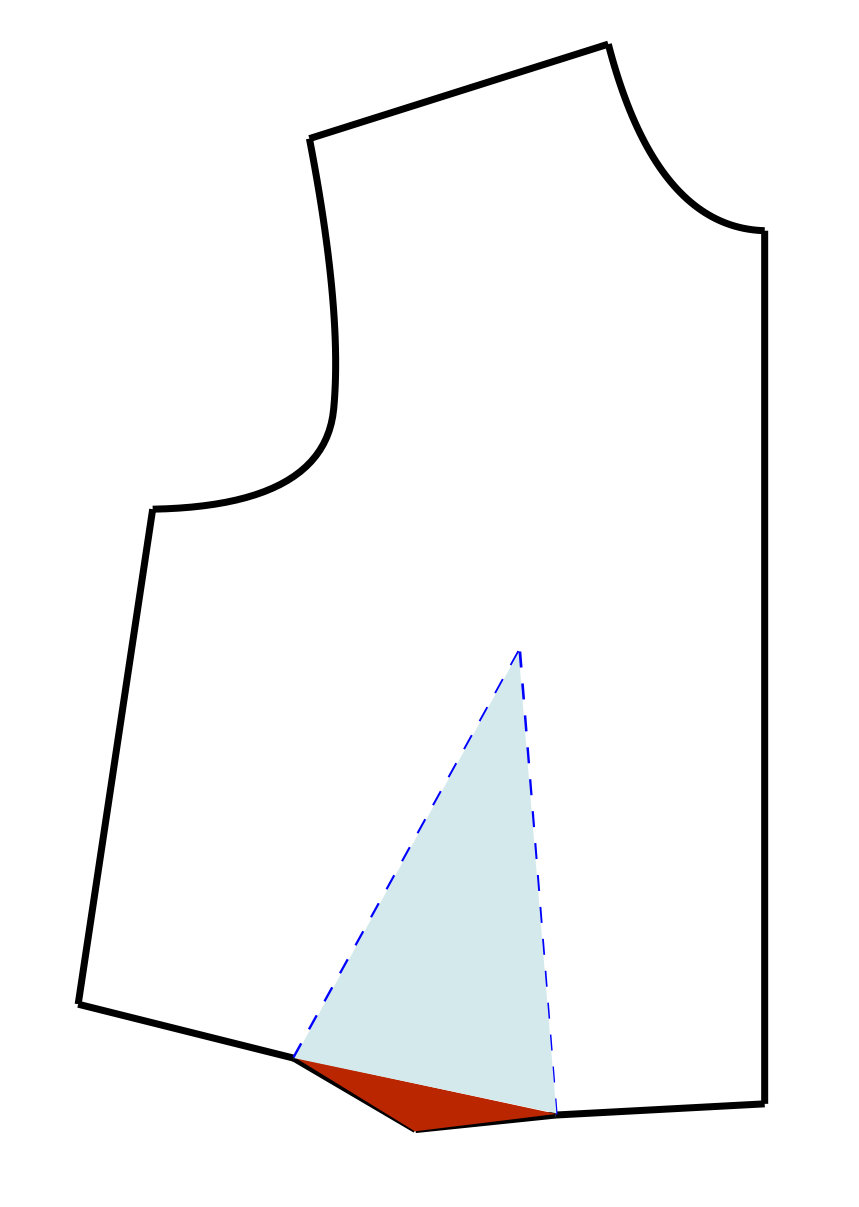
Bust Dart with Folding Extension
When you create darts in PatternMaker Pro, you can register them. During this process it asks you to define the direction of the fold. It then calculates that extra fabric required and adds the geometry for it. It also equalizes the length of the dart legs so they are the same to avoid puckering when sewing.
Seam Allowances & Stitching Lines
As you know, sewing patterns are outlined and cut out on the seam allowance line. Other than a brief mention in the instructions of the seam allowance width, you never actually see the stitching line of the pattern without the seam allowance. This causes a lot of confusion when you start drafting.
The seam allowance is secondary to the design process itself. It is one of the very last things that will be added when drafting. It is simply a border added at the very end to allow for joining the pattern pieces.
All your design and measurements are to the stitching line. That is the most important part of the draft. The drafted side seam of the front and back must be the same length. The same thing goes for the shoulder seam or inseams of pants.
Your sewing skills will increase greatly if you keep this in mind as you are constructing your garments. Nowhere is this more important than a shoulder seam as illustrated below. Always align your patterns on the stitching line, not the seam allowance. When shoulder lines meet at an angle (like at the neck point or armhole), the raw outer corner of the seam allowance sticks out at a different angle than the actual sewing corner. Matching raw edges on angled seams guarantees misalignment on the actual stitching line.
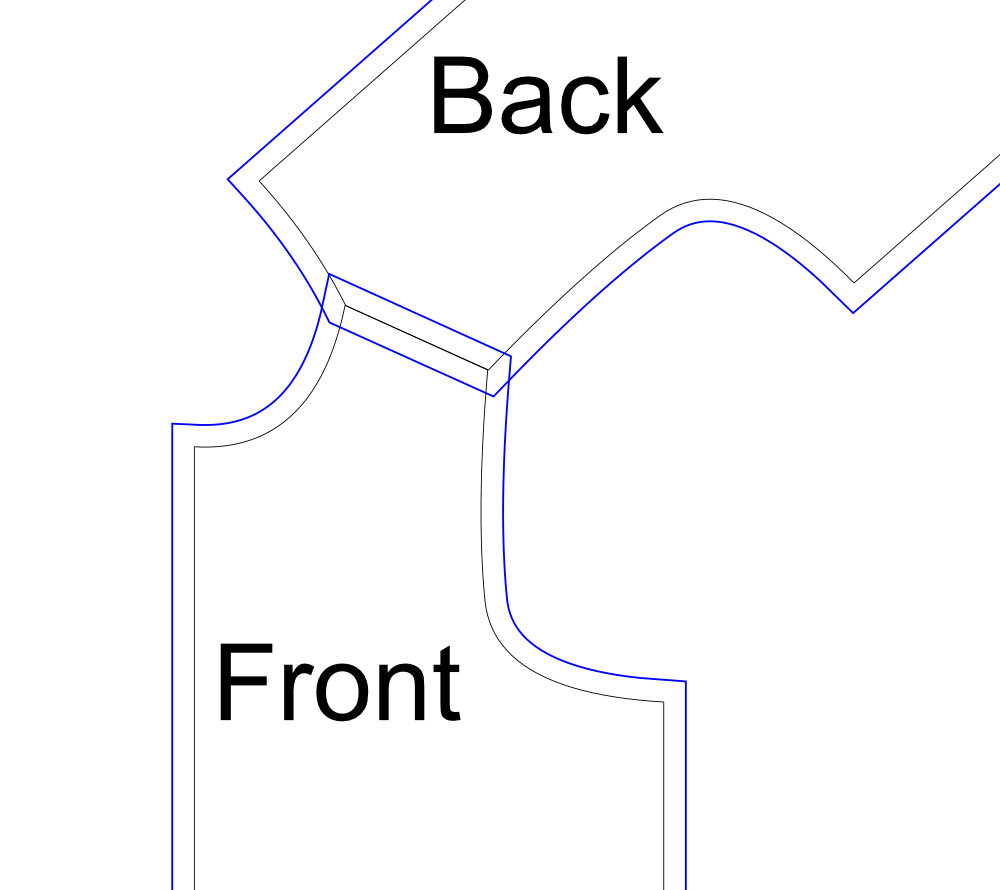
Bodice Shoulder Seam Aligned on Stitching Line
You may even choose to pencil in missing stitching lines to aid in alignment. PatternMaker Pro patterns include both the seam allowance and stitching lines in different colors to distinguish them.
Walking Seams
It is really frustrating when you cut out your fabric and go to pin seams and they don’t align. A back shoulder seam is longer than the front, or the front and back side seams are different lengths.
To literally “walk a seam” you’ll match one pattern to another at the bottom of the seam and then “walk” one pattern up the line on the other until you get to the top. They should be the same length. This is a bit tedious and you can achieve the same thing by just measuring both of them to make sure they are the same length. In PatternMaker Pro use the Compare Line/Curve tool.
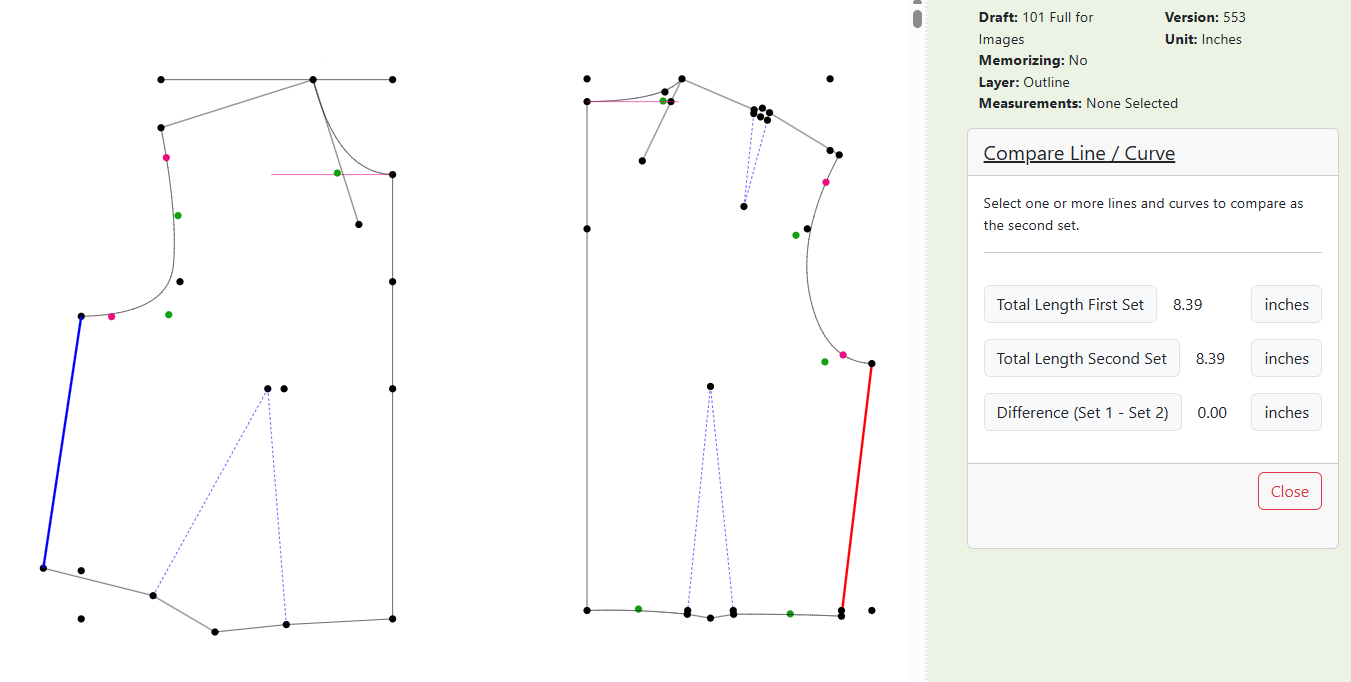
Comparing the Length of the Side Seam
If you have really long seams, like the outseam on pants, it is beneficial to add marks a measured distance down both patterns. Then you can match these marks as you’re pinning to avoid stretching as you go. Use the Alignment Marks tool in PatternMaker Pro to do this quickly.
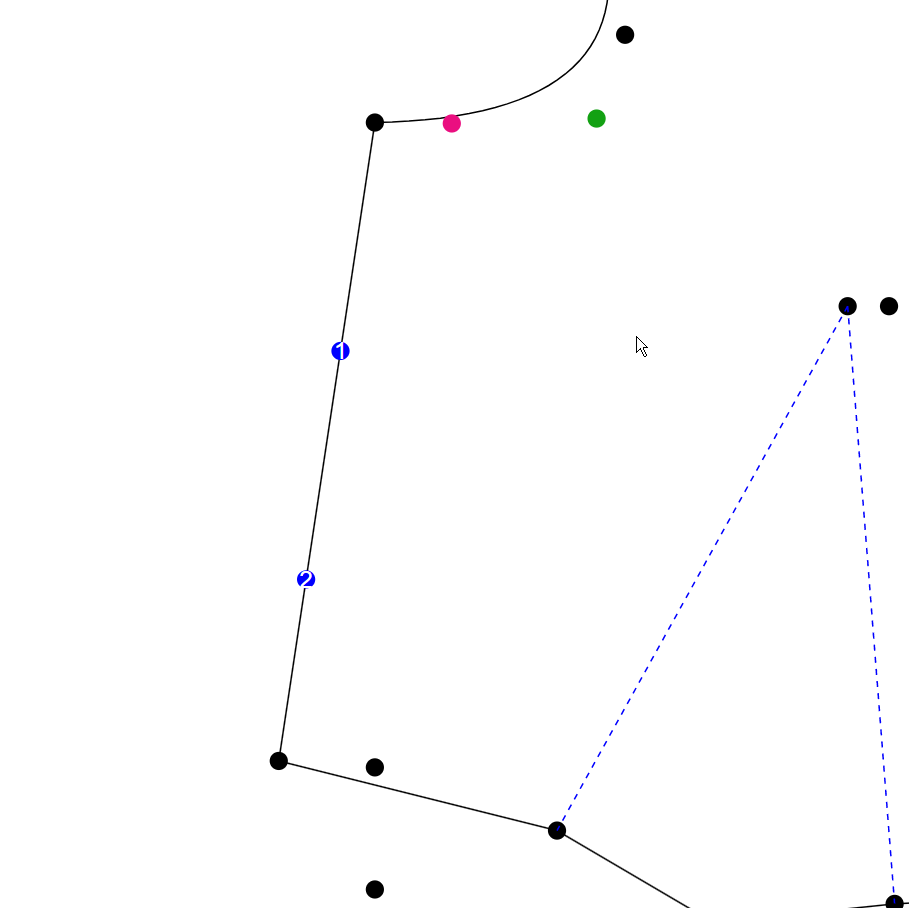
Alignment Markers on Side Seam
Armholes & Sleeves
This is possibly the most frustrating thing in drafting and sewing. Sleeves are weirdly shaped and hard to sew into armholes. I’ll show you why they are shaped as they are later on this page when we take a look at a real arm flattened. Suffice it to say that cap height is necessary to go up and over the shoulder. The height varies depending on the fit of the garment. More relaxed fits can have flatter cap curves.
One key thing to watch out for when drafting is the measurement between your sleeve cap and your armholes. You don’t ever want your sleeve cap measurement to be less than your front and back armholes. It can be more, but not less.
How much more is a matter of strong debate. The closer they are in size the easier they are to sew. However, you will never get that tailored jacket sleeve fit unless the sleeve cap is larger. You have to ease in that extra length as you are sewing without creating puckers. That’s the nightmare. One thing I’ve learned is that the seam allowance makes a huge difference here. Keep your sleeve cap and armhole seam allowances down to 1/4” (6 mm) to make your life easier.
These guidelines pertain to woven fabrics, knits are different story. There is generally zero sleeve cap ease on knits and sometimes even negative ease, where the cap curve is slightly smaller than the armhole. Knit sleeves are much easier to sew because you can simply stretch the shorter piece to fit as you guide it through the machine.
You can use the Mark Sleeve Ease tool in PatternMaker Pro to calculate the differences before you print out your patterns. This allows you to make adjustments to get the exact ease you want.
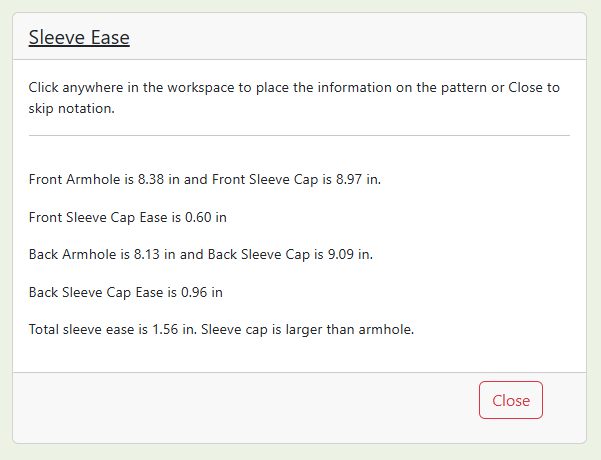
Sleeve Ease Tool Results
Crotch Length vs Crotch Extension
There is a big difference between crotch depth and the crotch extension. Here is an image showing both of them.
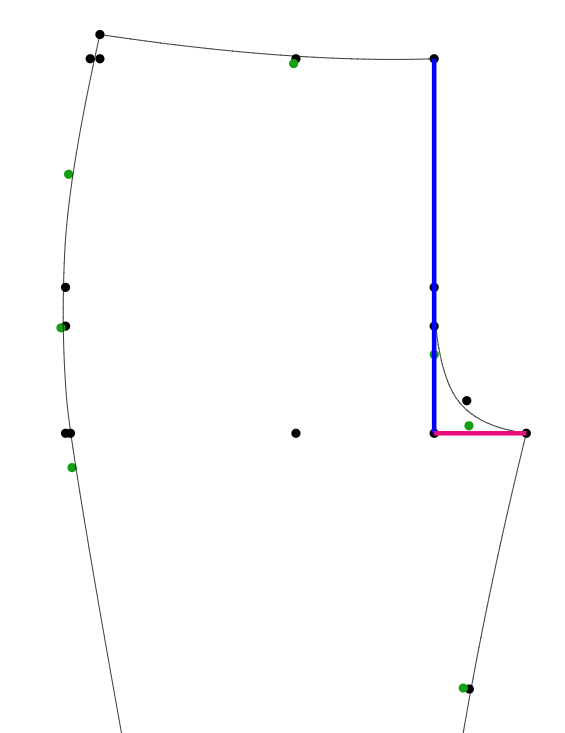
Crotch Length (blue) & Crotch Extension (pink)
The extension is the horizontal distance through the crotch. The crotch length is the vertical distance from the waist to the crotch.
Crotch curves are very difficult because there are so many variables. Larger bodies will need longer crotch extensions. Crotch length is typically more a reflection of height than weight. Everyone has a preference on where their waistbands sit and that also affects the crotch length. No one wants a wedgie!
Another thing you can’t see in a 2D cross-section is the tilt required on the center back line. This angle adds the crucial extra length needed in the back crotch to accommodate the body when sitting or bending. Without it you’ll get the famous “plumber’s crack”.
This is where a muslin really makes a difference. Mock up all pants to get that curve just right. You don’t even need to bother with the pant legs, just make shorts to save material.
Grainline
We have an entire chapter on fabric and grainline, but I want to just mention it here because it can also be a point of contention. If you are using a woven fabric, the grainline matters a lot. Woven fabrics have threads going vertically and horizontally. You want those threads to hang down the body. If you could see a single thread on an A line dress, it would start at the shoulder and end at the hemline and be very close to perfectly vertical.
This allows the weight of the garment to be supported by those long threads. It won’t sag, the hem will stay straight and it won’t look “off”. We’ll discover much more about grainlines later in the Academy.
2D to 3D
All the drafting and sewing books talk about taking a flat piece of fabric and turning it into a three-dimensional shape that fits a body. I’ve done the same in the Academy. It’s a great concept, but I think you really need to be able to see what this actually means.
Here is a 3D model of Susan, my go-to figure. I’m using Blender, a 3D modeling program for this example because it has a very unique ability. It can take a shaped form and flatten it. That's exactly what we need to see to understand why a pattern draft looks the way it does.
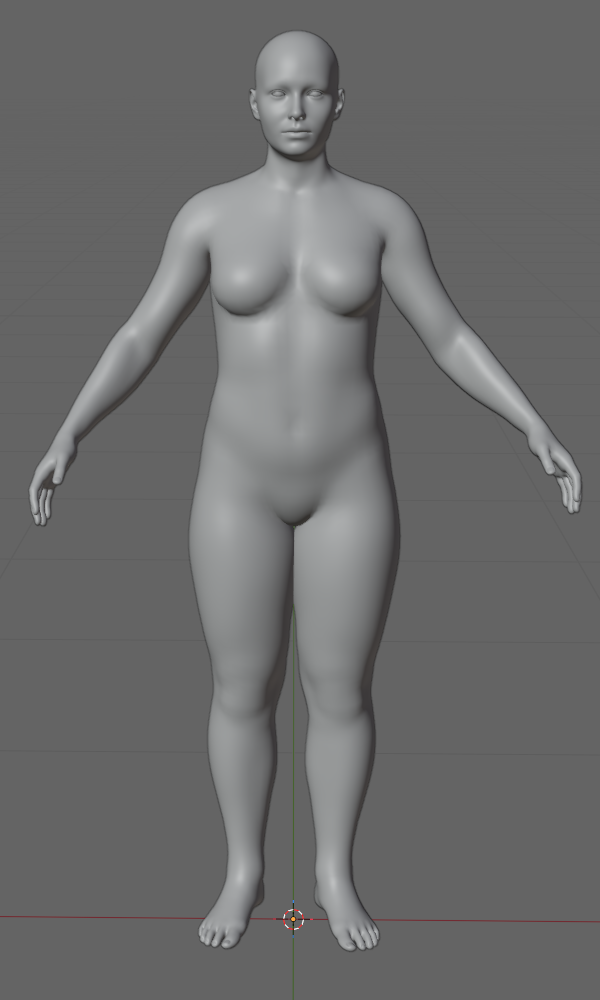
Susan in Blender
You need to remember that my Blender images are purely based on a real dimensional body. All I’ve done is delete some things, like hands, feet and head. I didn’t mess with the geometry in any way. I must say that I was really quite shocked at these results. I didn’t think the comparisons would be so clear-cut.
I split the body in half, since that is how we draft symmetrical patterns. You can see that I’ve also separated the arm at the shoulder and the torso from the legs.
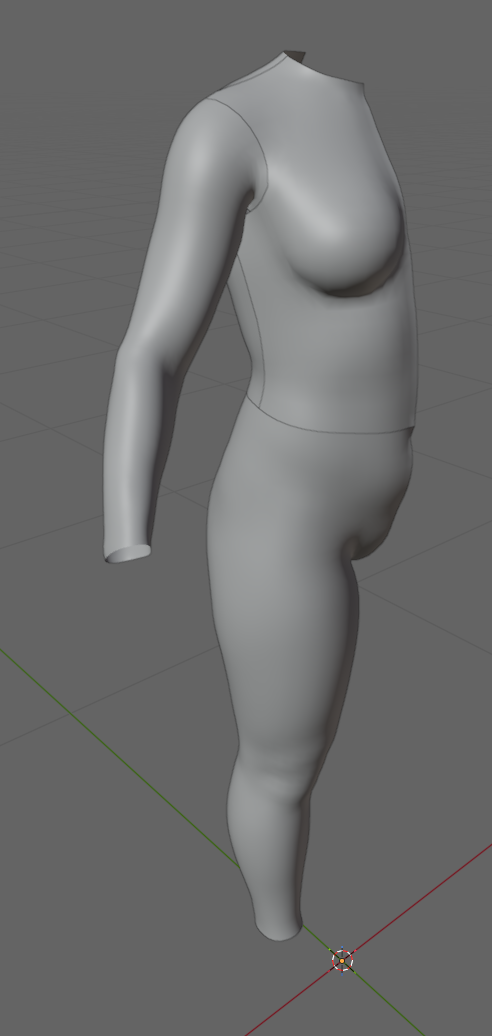
Divided 3D Model
We’ll take a look at the leg first. Here is the leg showing a side seam and there is also an inseam on the other side.
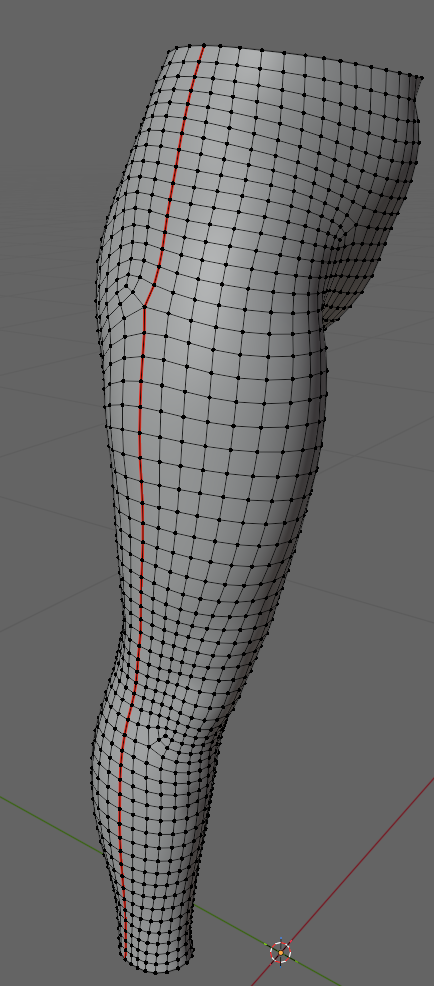
Leg Seam Marked
Here is the leg laid out flat. I’ve put a leggings draft next to it. The draft matches the layout of the body leg. This clearly shows that the back pant, shown to the left is deeper and wider than the front. It is also tilted back at the center back line to accommodate sitting down. You’ll run into this tilt constantly as you draft pants.
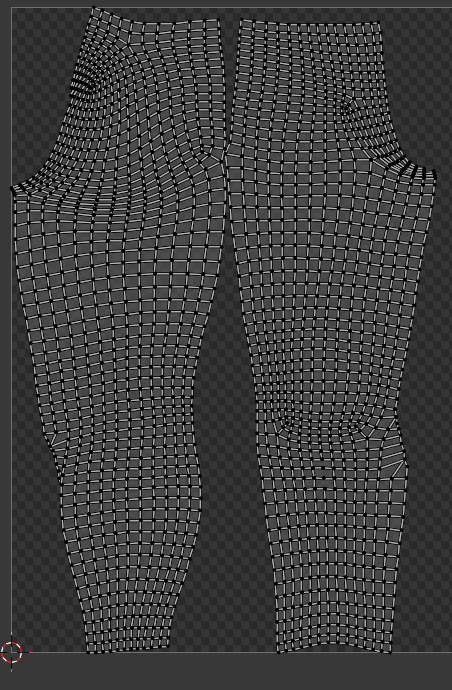
Back Leg on Left - Front Leg on Right
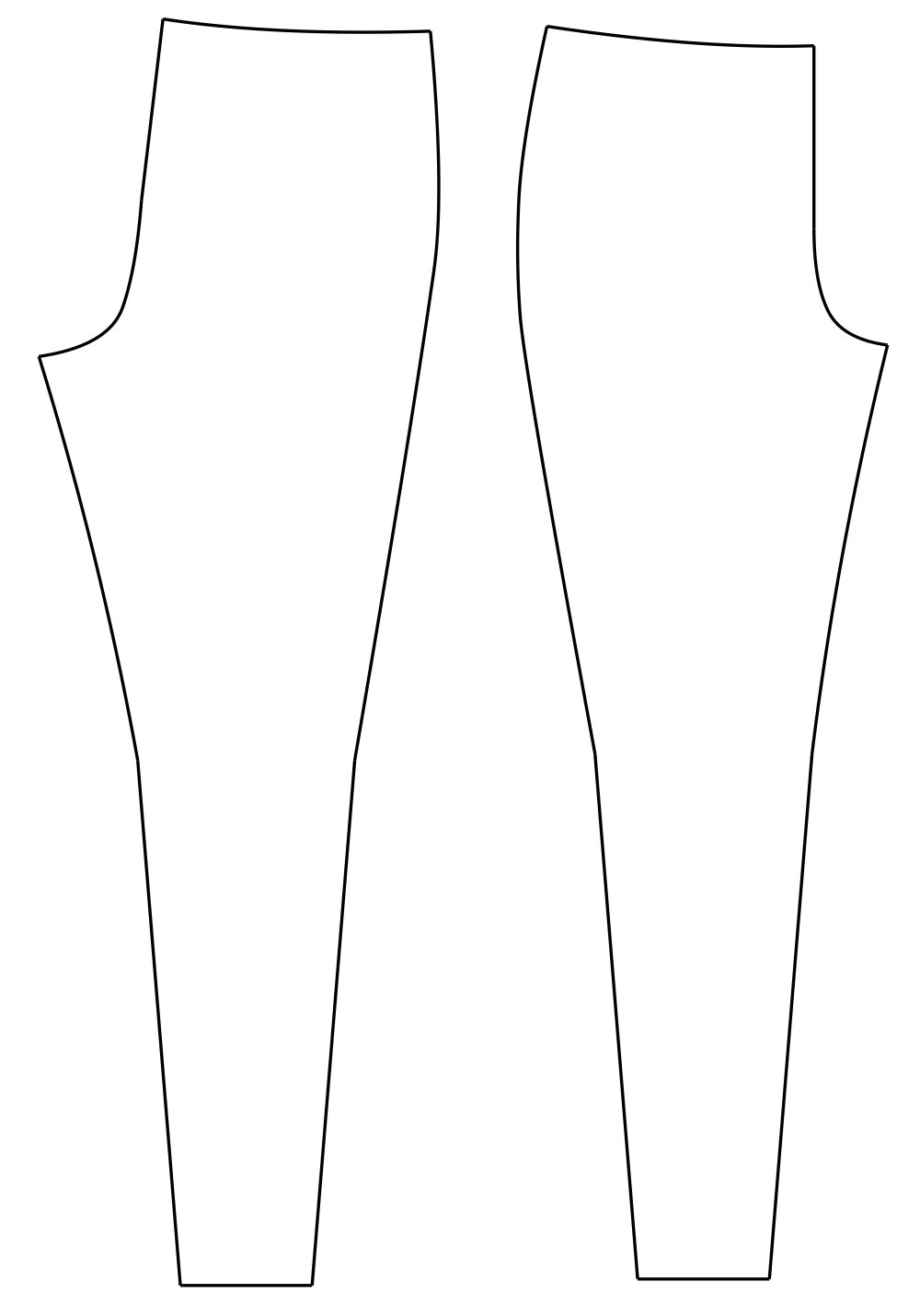
Leggings Pattern Pieces
Here is the arm marked with an underarm seam where it will be split.
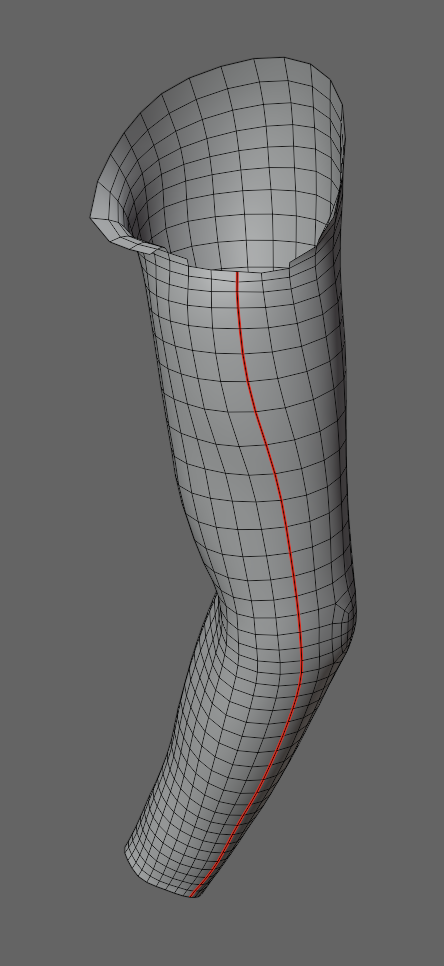
Arm Seam Marked
Here is the arm flattened with a sleeve pattern next to it. The correlation is amazing. You can see where the outline is higher in the center where it has to come up and over the shoulder. This is called the sleeve cap on the pattern. There are curvy dips to each side of the cap really show the shaping as the pattern goes up into the armpit underneath.
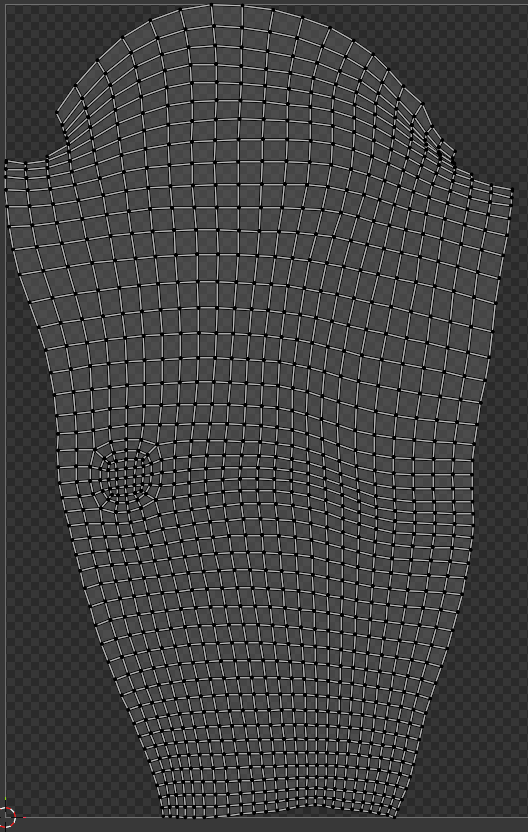
Arm Flattened / Sleeve Pattern
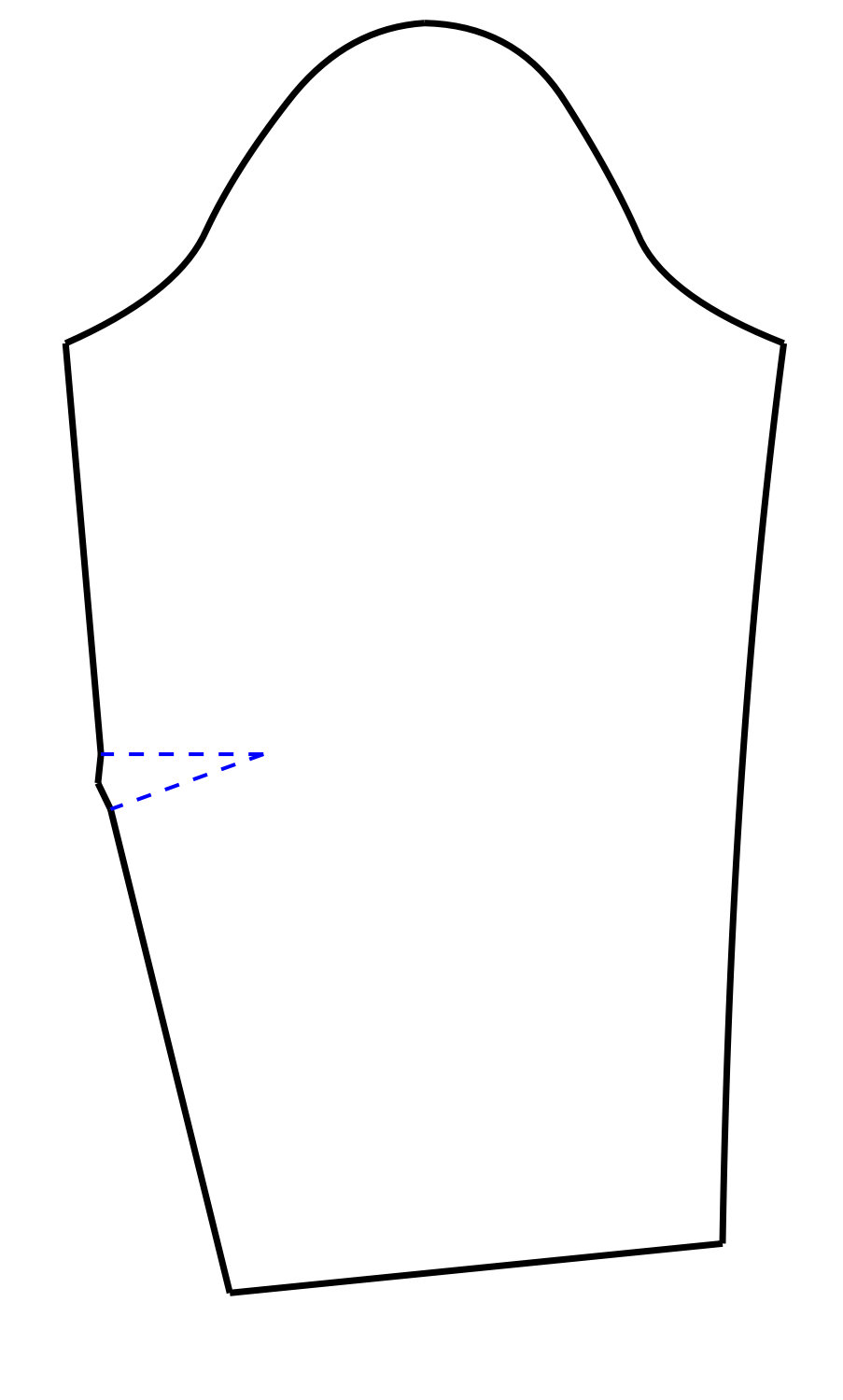
Sleeve Pattern Piece
Here is the back body torso. You can see where I’ve separated it from the front at the shoulder and side seam.
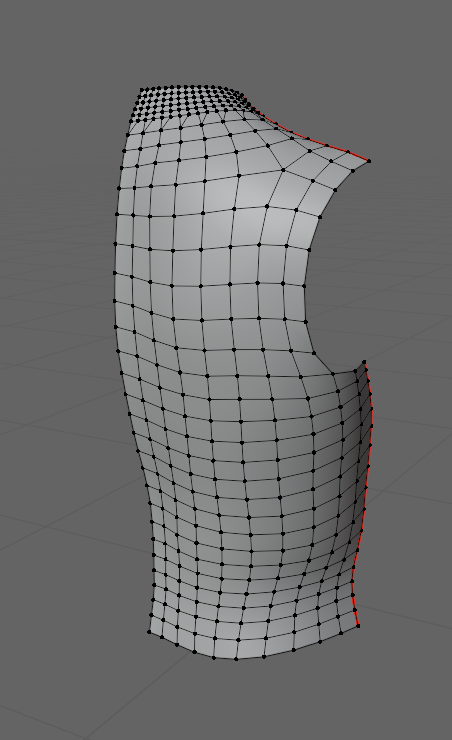
Back Seams Marked
Here is the back torso flattened next to a bodice back draft. These are nearly identical. The pattern has darts at the shoulder and waist for shaping.
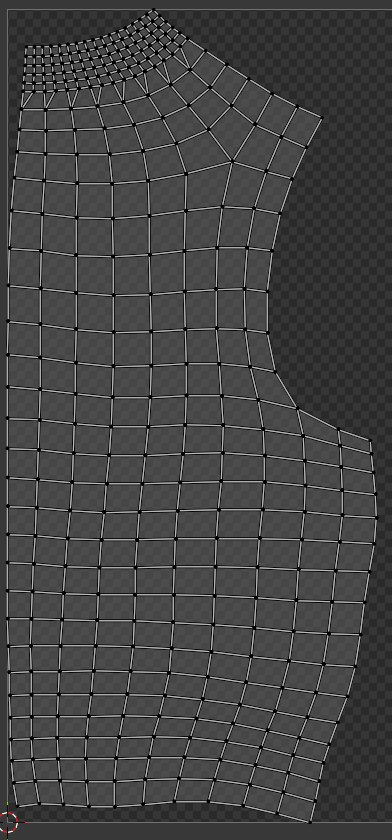
Back Flattened
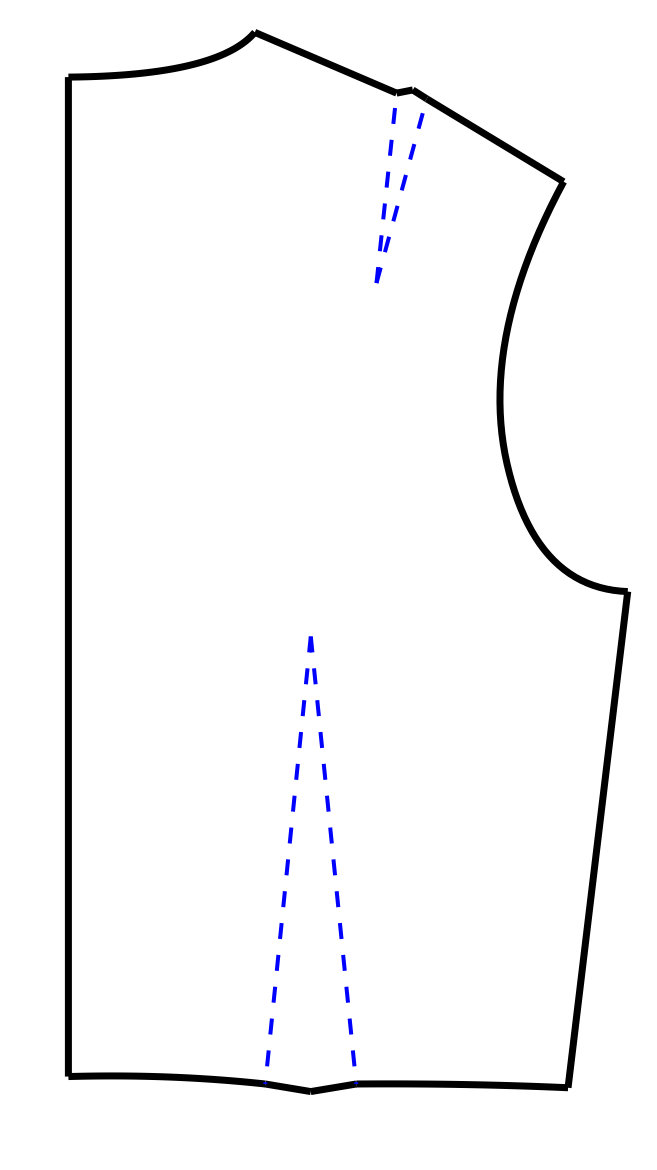
Back Pattern Piece
Here is the front torso flattened. Notice how much deeper a front armhole is as opposed to the back. Also, the pattern totally flayed out where I cut it for the bust. This highlights how much shaping can be achieved with darts. The bodice front pattern clearly shows a dart in the same location.
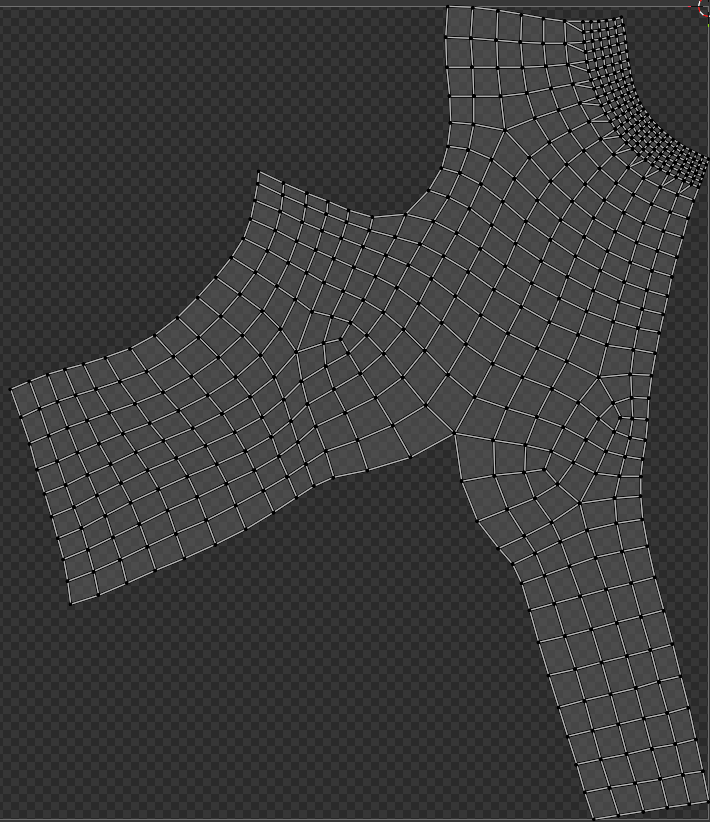
Front Flattened (Neckline top right)
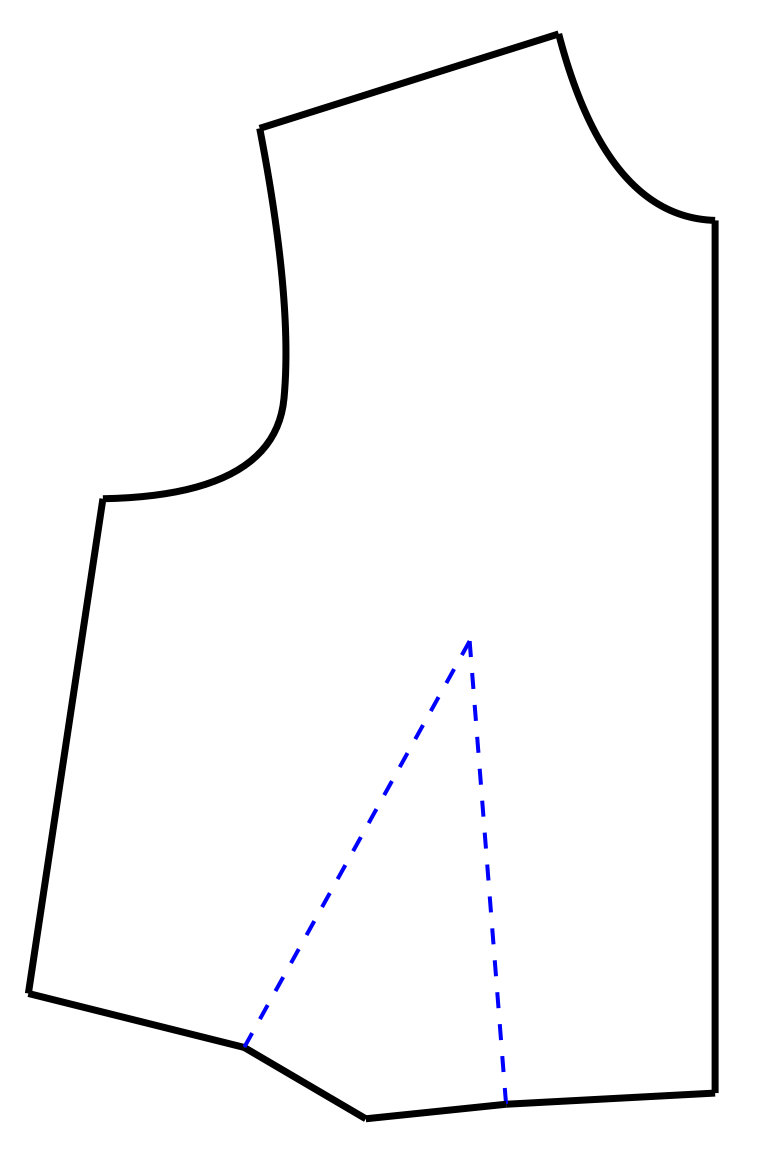
Front Pattern Piece
The fact that you can take an actual 3D body form and flatten it, resulting in nearly perfect “patterns” highlights the purpose of drafting. You are using a few special techniques, like darts and specifically placed seams, to make a flat piece of fabric fit the human form.
I hope these insights make drafting a bit easier, and a lot more fun, as we keep building.