Patternmaking with PatternMaker Pro

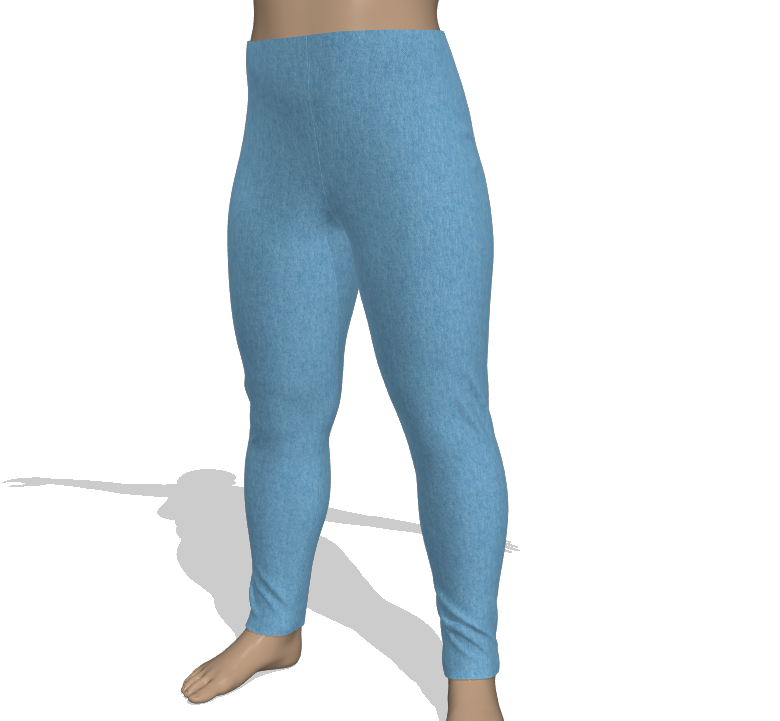
These instructions are for a draft of a full-length knit pant block pattern that is very conforming, like leggings. It is meant for two-way stretch knit fabrics.

Since this is a block, it is a great starting point for more advanced fashion designs. The draft doesn't include a waistband, but the PatternMaker Pro Add Waistband tool would make quick work of adding one.

Page 1
Measurements Used:

If you would like to see detailed images of each of these measurements demonstrated on a model and on a sample pattern for better understanding, please visit https://PatternMakerPro.com/measurements.html.

If you are using the memorization system in PatternMaker Pro, we recommend that you include these ease variables in your formulas. This will allow you to recall the draft with different amounts of ease depending on the needs of the final style/design.

PatternMaker Pro

Each step in the instructions includes the category and name of each tool used, as well as its icon, for easy selection in PatternMaker Pro.

Values in curly braces {Center Length Back} are selections from a measurement set used in a formula. Values in square brackets are Measure Between Points tool selections ([Measure 1Center Neck Back to 4Armhole Ht]), also used in formulas. Always be mindful of parenthesis placement to force the correct math order of operations.

Movement / Direction

The instructions use X and Y to define direction.

X is horizontal movement. A positive X value moves to the right. A negative X values moves left.

Y is vertical movement. A positive Y value moves down and a negative Y value moves up.
Page 2
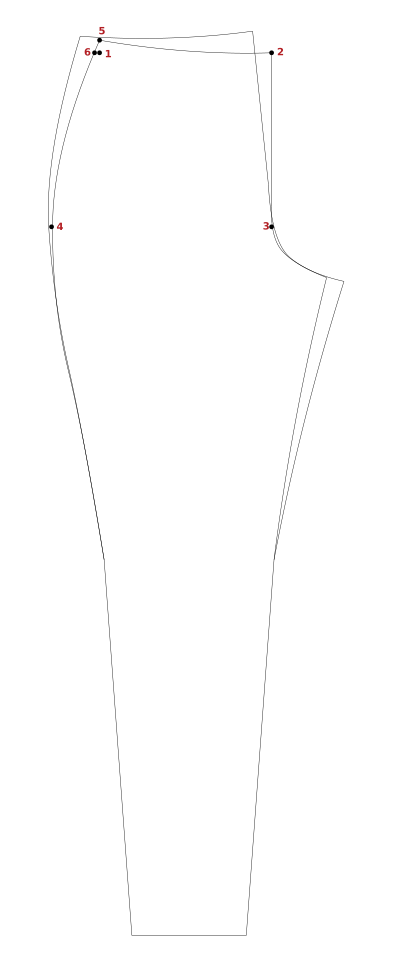
Figure A Draft

1 Waist Side Ref
This pattern drafts towards the right. Place this point to the left.

2 Waist Ctr Fr
1Waist Side Ref
X: ({Waist Natural} + {Waist Ease}) / 4

3 Hip Ctr Fr
2Waist Ctr Fr
Y: {Waist to Hip Side}

4 Hip Side Fr
3Hip Ctr Fr
X: -({Hip} + {Hip Ease}) / 4

5 Waist Side Fr
1Waist Side Ref
Y: -0.625" or -16mm

6 Side RP1 Fr
1Waist Side Ref
X: -0.25" or -6.35mm

Page 3
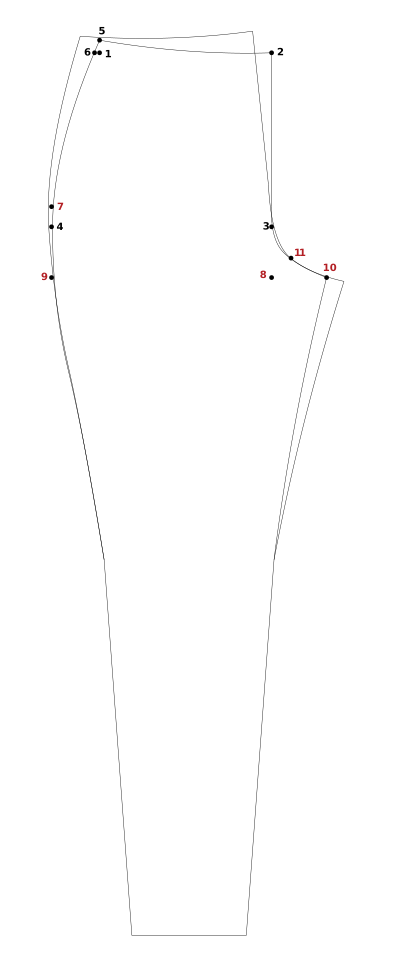
Figure B Draft

7 Side RP2 Fr
4Hip Side Fr
Y: -1" or -25.4mm

8 Crotch Ctr Fr
2Waist Ctr Fr
Y: {Crotch Depth} + {Crotch Depth Ease}

9 Crotch Side Fr
4Hip Side Fr
8Crotch Ctr Fr
X: Hip Side Fr
Y: Crotch Ctr Fr

10 Crotch Ext Fr
8Crotch Ctr Fr
X: [4Hip Side Fr to 3Hip Ctr Fr] / 4

11 Crotch CP1 Fr
3Hip Ctr Fr, 10Crotch Ext Fr
Extend: 8Crotch Ctr Fr
Distance: [8Crotch Ctr Fr to 10Crotch Ext Fr] / 2

Page 4
Figure C Draft

12 Center Ref
9Crotch Side Fr
10Crotch Ext Fr
X: Center
Y: Center

13 Waist CPR Fr
12Center Ref
2Waist Ctr Fr
X: Center Ref
Y: Waist Ctr Fr

14 Pant Length
13Waist CPR Fr
Y: {Outseam}

15 Ankle Side Fr
14Pant Length
X: -{Ankle} / 4

16 Ankle Ctr Fr
14Pant Length
X: {Ankle} / 4

Page 5
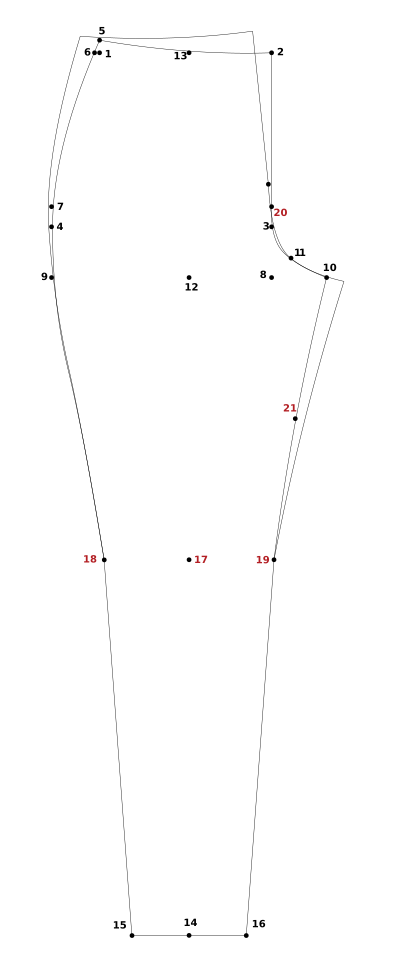
Figure D Draft

17 Knee RP
13Waist CPR Fr
Y: {Waist to Knee}

18 Knee Side Fr
17Knee RP
X: -{Knee} / 4

19 Knee Ctr Fr
17Knee RP
X: {Knee} / 4

20 Crotch CP2 Fr
3Hip Ctr Fr
Y: -1" or -25.4mm

21 Inseam RP Fr
10Crotch Ext Fr & 19Knee Ctr Fr
X: Center
Adjust X: -0.25" or -6.35mm
Y: Center

Page 6
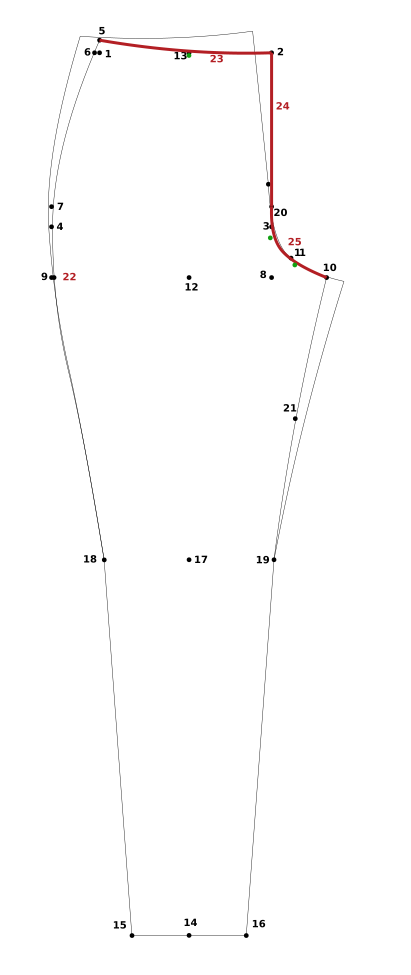
Figure E Draft

22 Side RP3 Fr
9Crotch Side Fr
X: 0.125" or 3mm

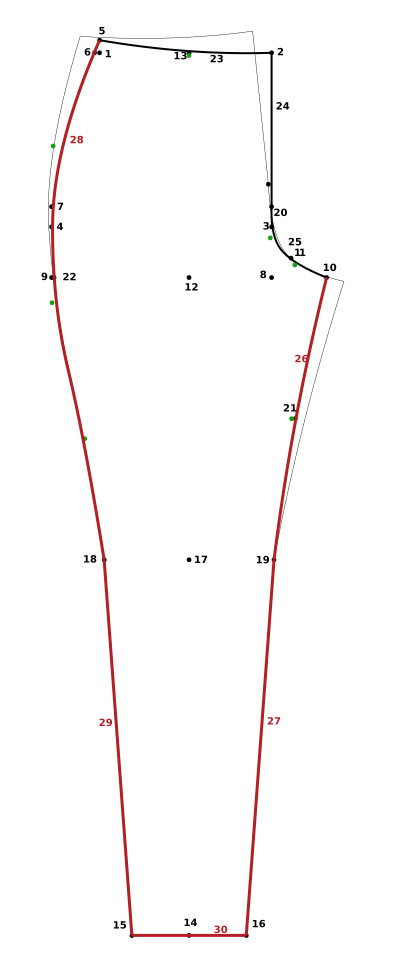
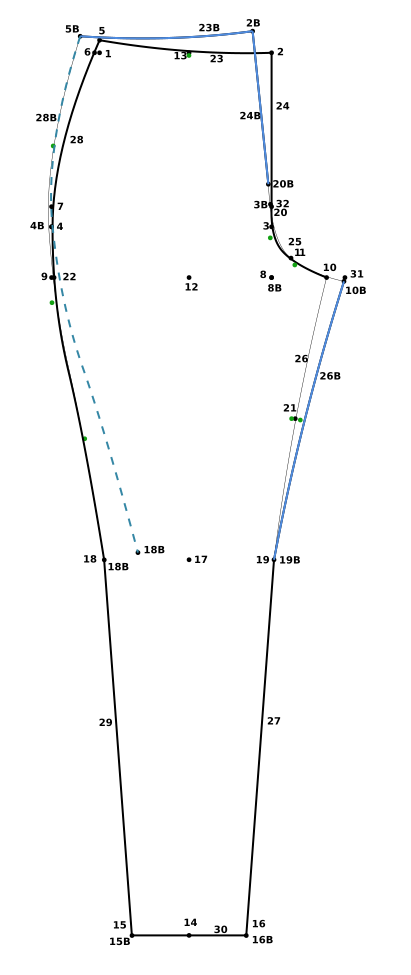
Front Outline
Parent: PMP
Save & Switch

23 Waist Curve Fr
5Waist Side Fr to 2Waist Ctr Fr
Curve Points: 1
Drag the curve point down to the
13Waist CPR Fr to make a gentle curve.

24 Crotch Line Fr
2Waist Ctr Fr to 20Crotch CP2 Fr

25 Crotch Curve Fr
20Crotch CP2 Fr to 10Crotch Ext Fr
Curve Points: 2
Drag the points using the 3Hip Ctr Fr and
11Crotch CP1 Fr as guides. Make sure there is a smooth transition into the 24Crotch Line Fr.

Page 7
Figure F Draft

26 Inseam Curve Fr
10Crotch Ext Fr to 19Knee Ctr Fr
Curve Points: 1
Drag the point so the curve runs through
21Inseam RP Fr.

27 Inseam Line Fr
19Knee Ctr Fr to 16Ankle Ctr Fr

28 Outseam Curve Fr
5Waist Side Fr to 18Knee Side Fr
Curve Points: 3
Drag the curve points using the 6Side RP1 Fr,
7Side RP2 Fr and 22Side RP3 Fr as guides. Make sure it blends into the 18Knee Side Fr.

29 Outseam Line Fr
18Knee Side Fr to 15Ankle Side Fr

30 Ankle Line Fr
15Ankle Side Fr to 16Ankle Ctr Fr

Page 8
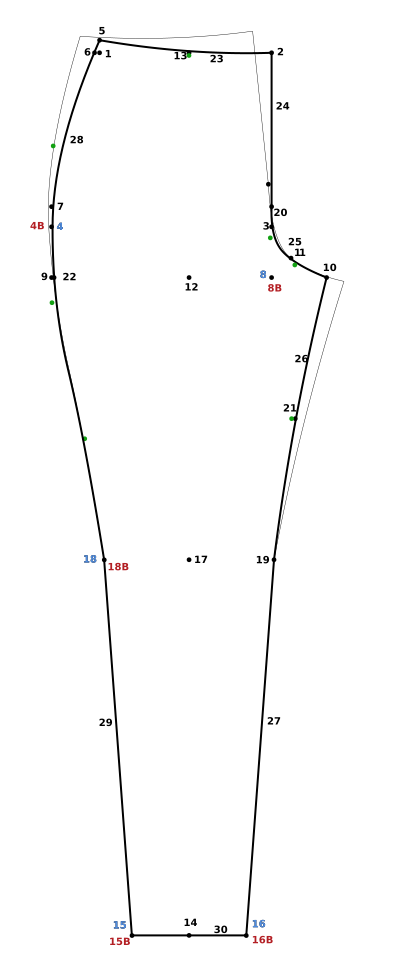
Figure G Draft

Front Draft

Change: Draft Layer

Back Draft
4Hip Side Fr, 8Crotch Ctr Fr, 15Ankle Side Fr,
16Ankle Ctr Fr, 18Knee Side Fr
Copy to New Layer: Back Draft
Parent: PMP
Find: Fr
Replace: Bk
Save & Switch
It will be difficult to see the point names with all layers visible. The back labels will be on top of the front.

Page 9
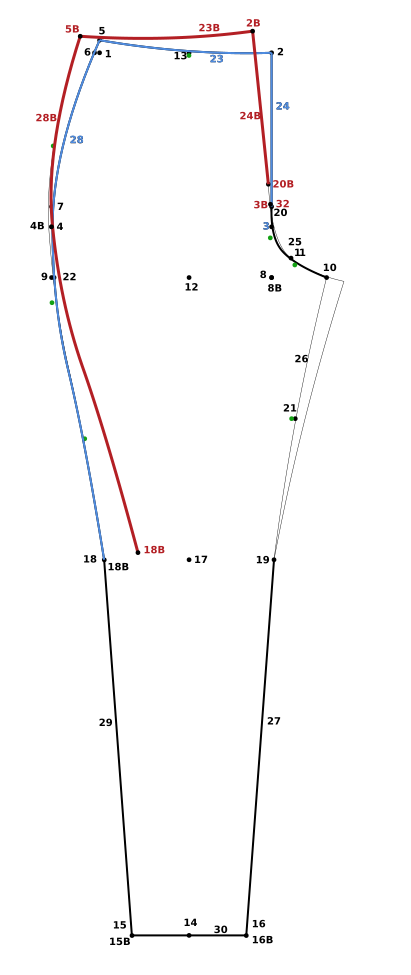
Figure H Draft

Back Hip Rotation
28Outseam Curve Fr, 23Waist Curve Fr,
24Crotch Line Fr, 3Hip Ctr Fr point
Copy to New Layer: Back Hip Rotation
Parent: PMP
Find: Fr
Replace: Bk
Save

32 Hip Target
3BkHip Ctr Bk
Y: -1.125" or -28.5mm
Style: Blue Solid
This color change is so that it is easier to see.

Layer: Back Hip Rotation
Moving: 3BkHip Ctr Bk
Target: 32Hip Target
Pivot: 4BkHip Side Bk

Page 10
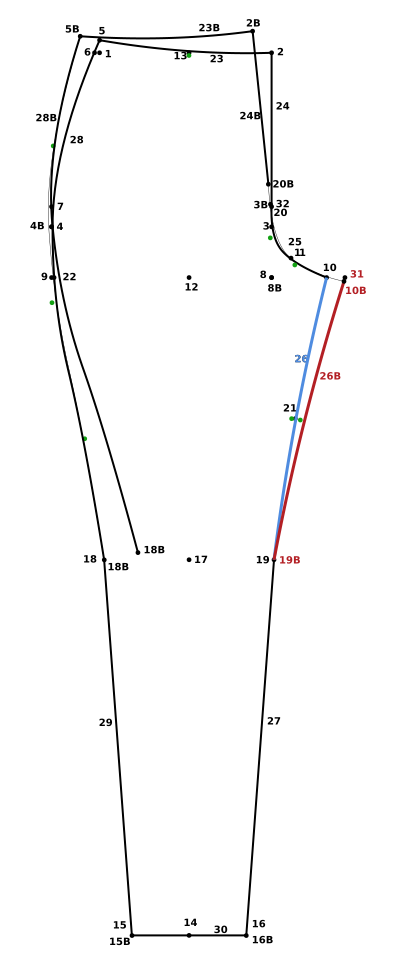
Figure I Draft

Back Inseam Rotation
26Inseam Curve Fr
Copy to New Layer: Back Inseam Rotation
Parent: PMP
Find: Fr
Replace: Bk
Save

Hide Front Draft and Front Outline layers.

31 Crotch Ext Target
8BkCrotch Ctr Bk
X: [4BkHip Side Bk to 3BkHip Ctr Bk] / 3

Layer: Back Inseam Rotation
Moving: 10BkCrotch Ext Bk
Target: 31Crotch Ext Target
Pivot: 19BkKnee Ctr Bk

Page 11
Figure J Draft

28BkOutseam Curve Bk
Style: Aqua Blue Dash

Show Front Outline layer.

Lower opacity on Front Outline so that it is very light, but still visible.

Back Outline
23BkWaist Curve Bk, 24BkCrotch Line Bk,
26BkInseam Curve Bk
Move to New Layer: Back Outline
Parent: PMP
Save & Switch

Page 12
Figure K Draft

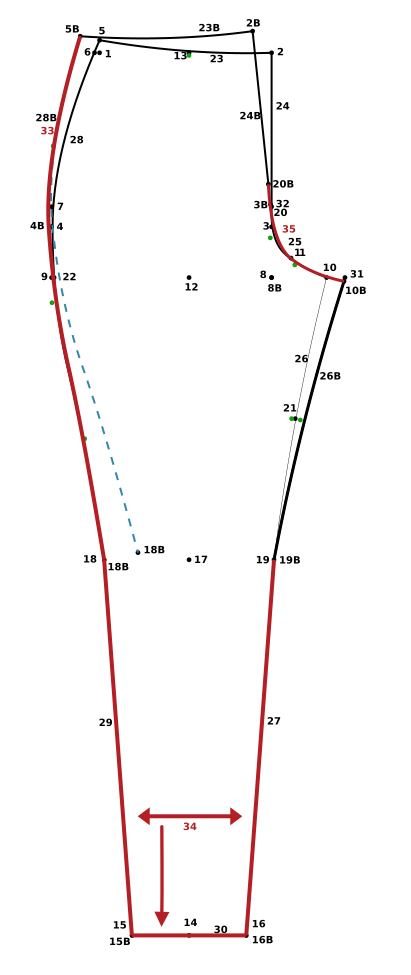
33 Outseam Curve Bk
5BkWaist Side Bk to
18BkKnee Side Bk (not the rotated point)
Curve Points: 3
Move the curve points so the curve follows the blue dashed curve from the 5BkWaist Side Bk to the
4BkHip Side Bk, then conform to the
28Outseam Curve Fr.

34 Outline Back
18BkKnee Side Bk to 15BkAnkle Side Bk, 16BkAnkle Ctr Bk, 19BkKnee Ctr Bk

35 Crotch Curve Bk
20BkCrotch CP2 Bk to 10BkCrotch Ext Bk
Curve Points: 2
Move the curve points to transition smoothly from the 24BkCrotch Line Bk following the 25Crotch Curve Fr shape when possible.